

Subtotal: $105.49
6%
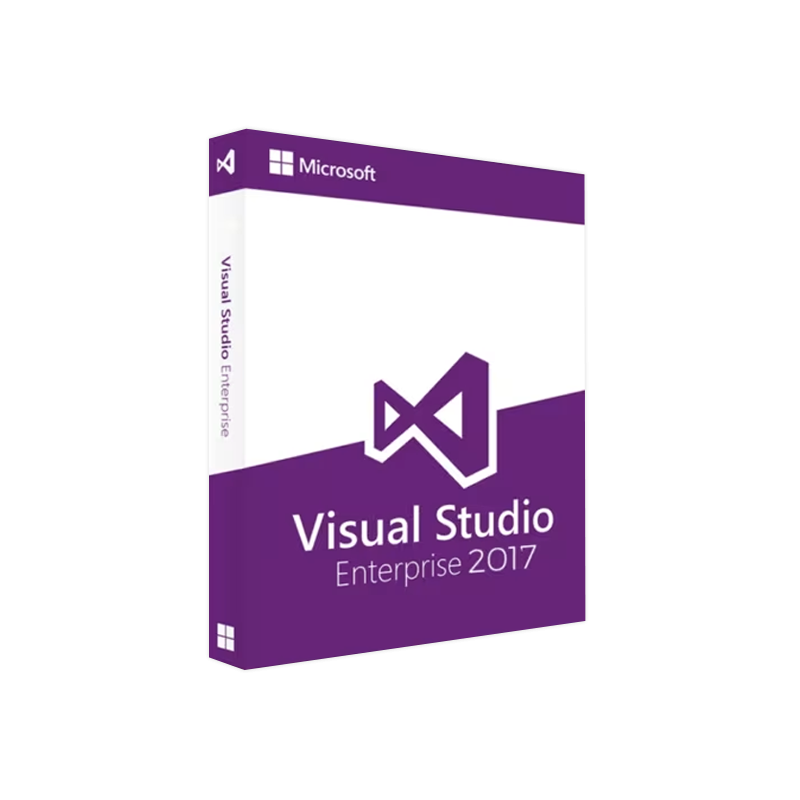

Microsoft Visual Studio 2017 Enterprise – Lifetime License Product Key Instant Delivery
In Stock
✔ Quick Delivery
✔ 100% Original License
✔ Lifetime Warranty
✔ Free Support
In Stock
Description
Microsoft Visual Studio 2017 Enterprise – The Ultimate Development Platform for Professionals
Unlock the full potential of your development teams with a genuine, fully‑licensed copy of Visual Studio 2017 Enterprise. Designed for large‑scale, mission‑critical projects, this edition delivers end‑to‑end tools, advanced testing, and deep Azure integration—all backed by Microsoft’s industry‑leading support.
Why Choose Visual Studio 2017 Enterprise?
When you Buy Visual Studio 2017 Enterprise license you gain access to a suite of capabilities that far exceed the Community and Professional editions. Below are the core advantages that make the Enterprise edition the preferred choice for enterprise‑grade development teams.
- Comprehensive Architecture & Modeling – Layer diagrams, dependency validation, and UML tools for robust system design.
- Advanced Debugging & Diagnostics – IntelliTrace, snapshot debugger, and live unit testing to accelerate issue resolution.
- Enterprise‑Scale Testing – Automated UI testing, load testing, and Microsoft Fakes for isolation testing.
- Secure DevOps Integration – Built‑in support for Azure DevOps, Git, and Team Foundation Server (TFS).
- Performance & Scalability – Code profiling, concurrency visualizer, and static code analysis for high‑performance applications.
- Premium Support – 24/7 Microsoft Premier Support and regular feature updates for uninterrupted productivity.
“Visual Studio 2017 Enterprise transformed our development workflow, cutting release cycles by 30 % while improving code quality.” – CTO, Global FinTech Firm
Feature Comparison – Enterprise vs. Professional vs. Community
| Feature | Visual Studio 2017 Enterprise | Visual Studio 2017 Professional | Visual Studio 2017 Community |
|---|---|---|---|
| IntelliTrace (Historical Debugging) | ✅ Full | ✅ Limited | ❌ |
| Live Unit Testing | ✅ | ❌ | ❌ |
| Code Map & Architecture Validation | ✅ | ✅ (basic) | ❌ |
| Microsoft Fakes (Isolation Framework) | ✅ | ❌ | ❌ |
| Load & Performance Testing | ✅ | ❌ | ❌ |
| Azure DevOps Integration | ✅ Advanced | ✅ Standard | ✅ Basic |
| License Cost | Premium | Mid‑range | Free |
| Support Level | 24/7 Premier | Business Hours | Community Forums |
Bold entries highlight the unique selling points of the Enterprise edition.
Getting Started – Quick Steps
- Purchase your Visual Studio 2017 Enterprise genuine license key from our secure store.
- Download the installer via the official Microsoft Visual Studio 2017 Enterprise download page* (link below).
- Run the installer and enter your Visual Studio 2017 Enterprise activation key when prompted.
- Register the product to activate Premium Support and receive future updates automatically.
System Requirements
| Component | Minimum | Recommended |
|---|---|---|
| OS | Windows 10 (Version 1507) or Windows 7 SP1 | Windows 10 (Version 1709) or Windows Server 2016 |
| Processor | 1.8 GHz or faster | 2.5 GHz or faster, multi‑core |
| RAM | 2 GB (4 GB if running on a virtual machine) | 8 GB or more |
| Hard Disk | 20 GB of free space | SSD with 30 GB+ free space |
| Graphics | Minimum DirectX 9 graphics device | DirectX 10 compatible GPU |
| .NET Framework | .NET Framework 4.6 | .NET Framework 4.7.2 or later |
| Browser | Internet Explorer 11 or later | Edge, Chrome, Firefox (latest) |
| Additional | Visual C++ 2015 Redistributable | Windows 10 SDK, Azure SDK (optional) |
All specifications are based on Microsoft’s official documentation.
Frequently Asked Questions
| Question | Answer |
|---|---|
| What is a Microsoft Visual Studio 2017 Enterprise product key? | A unique alphanumeric string that validates your license and unlocks all Enterprise features. |
| Can I transfer my Visual Studio 2017 Enterprise license? | Yes, licenses are per‑user and can be reassigned under Microsoft’s volume licensing terms. |
| How do I obtain the Visual Studio 2017 Enterprise activation key? | After purchase, the key is delivered instantly via a secure email; you can also retrieve it from your account dashboard. |
| Is there a trial version? | A 30‑day trial is available on the official Microsoft portal – ideal for evaluation before Buy Visual Studio 2017 Enterprise license. |
| Do I need an internet connection for activation? | Activation requires an online connection the first time; subsequent offline usage is fully supported. |
Secure Your Development Future – Order Now
Investing in a Visual Studio 2017 Enterprise genuine license key guarantees you:
- Full compliance with Microsoft licensing policies.
- Immediate access to enterprise‑grade tooling and support.
- Scalable architecture capable of handling complex, multi‑team projects.
Take the next step toward faster, higher‑quality releases. Click the Buy Visual Studio 2017 Enterprise license button below and receive your activation key within minutes.
Helpful Resources (Outbound Links)
- Microsoft Visual Studio 2017 Enterprise Overview – Official product page: https://visualstudio.microsoft.com/vs/enterprise/
- System Requirements Documentation – Detailed specs: https://learn.microsoft.com/en-us/visualstudio/install/system-requirements
- Azure DevOps Integration Guide – How to connect VS 2017 Enterprise with Azure: https://azure.microsoft.com/en-us/services/devops/
Boost your team’s productivity, secure your codebase, and stay ahead of the competition with Microsoft Visual Studio 2017 Enterprise – the definitive development environment for professional software engineers.
Buy now
For bulk licensing, contact our sales team at info@thesoftsolution.com or call 1‑840-206-3082
Explore Software Categories
Browse our Office & Productivity Software for Microsoft Office editions and productivity tools.
Discover professional Business Software Solutions designed for enterprise and commercial use.
Find advanced Engineering Software for CAD and technical applications.
Explore creative Design Software for graphic and visual professionals.
Improve system performance with our Utilities Software.
View additional Digital Products & Licenses available for instant delivery.
Check out our Top Selling Products for the most popular choices.
Installation & Activation Support
Need help? Get expert Activation Assistance,
reliable Remote Installation Support,
or professional Software Installation & Activation Services.
Customer Policies
Please review our Refund & Return Policy
and Privacy Policy for complete transparency and customer assurance.
Reviews
There are no reviews yet.