No products in the cart.

0
Total
$0.00
Free Shipping on All Orders Over $75
Only this weekend
Super Discount
Items on sale this week
Top picks this week. Up to 50% off the best selling products.



✔ Quick Delivery
✔ 100% Original License
✔ Lifetime Warranty
✔ Free Support
Only logged in customers who have purchased this product may leave a review.
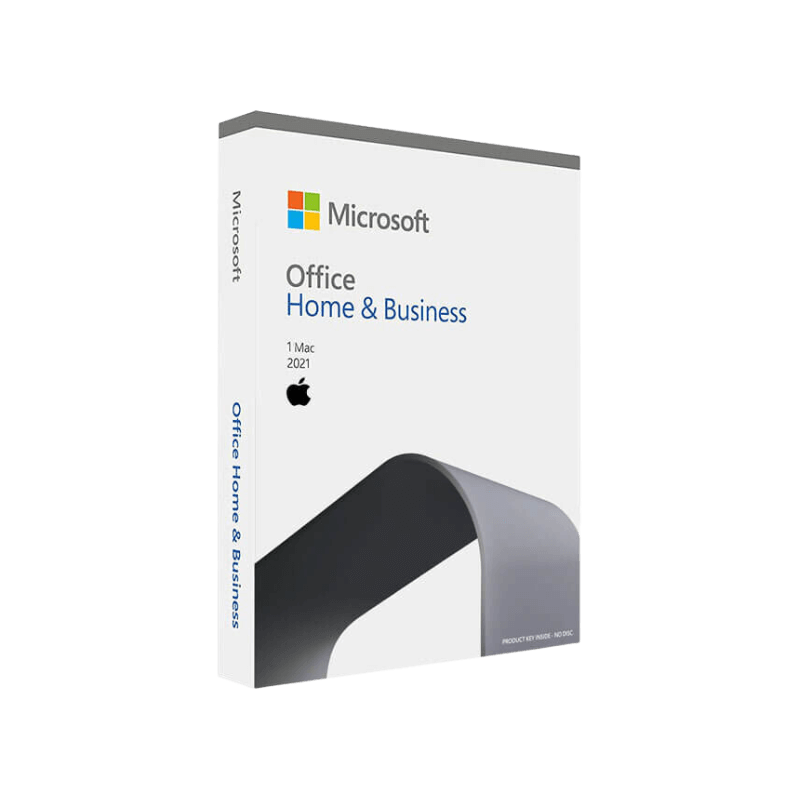
Designed for the modern professional who needs a reliable, secure, and feature‑rich office suite on macOS.
| Product | Microsoft Office 2021 Home & Business for Mac |
|---|---|
| Edition | One‑time purchase (per device) |
| License | 1 Mac device, includes Word, Excel, PowerPoint, Outlook |
| Target Users | Small‑business owners, freelancers, consultants, and any professional who prefers a perpetual licence over a subscription |
| Release Year | 2021 (latest perpetual version) |
| Compatibility | macOS 11 Big Sur and later (including macOS 13 Ventura) |
If you’re looking for a permanent solution that doesn’t require monthly billing, Microsoft Office 2021 Home & Business for Mac is the ideal choice.
Word, Excel, PowerPoint, and Outlook work together seamlessly, allowing you to create, analyse, present, and communicate without ever leaving the suite.
Unlike Microsoft 365, Office 2021 Home & Business is a perpetual licence. Pay once, own it forever—perfect for budgeting‑conscious professionals.
| Feature | Benefit for Professionals | How It Works |
|---|---|---|
| Real‑time Co‑authoring | Collaborate on documents without version confusion. | Multiple users edit the same file simultaneously; changes sync instantly. |
| Improved In‑Line Translation | Communicate with international clients effortlessly. | Select text → right‑click → Translate → choose language. |
| Dynamic Arrays (Excel) | Automate complex calculations with a single formula. | Use functions like SEQUENCE, SORT, FILTER. |
| Ink‑Enabled PDFs (Word) | Annotate contracts or briefs directly on the screen. | Draw with Apple Pencil → Ink tab → convert ink to text. |
| Focus Mode (PowerPoint) | Deliver distraction‑free presentations. | Hide UI elements → full‑screen slide view with presenter notes. |
| Outlook Clutter Management | Keep your inbox tidy and prioritize important emails. | Focused Inbox automatically separates priority mail. |
All these capabilities are built‑in, require no extra plugins, and are fully supported on macOS.
| Component | Minimum Requirement | Recommended |
|---|---|---|
| Operating System | macOS 11 Big Sur | macOS 13 Ventura (or later) |
| Processor | Intel Core i5 or Apple Silicon (M1) | Apple Silicon (M1/M2) or Intel Core i7 |
| RAM | 4 GB | 8 GB or more |
| Hard Disk Space | 10 GB of free storage | 20 GB SSD for optimal speed |
| Display | 1280 × 800 resolution | 1920 × 1080 or higher (Retina) |
| Internet | Required for activation & updates | Broadband (≥ 10 Mbps) for OneDrive sync |
| Additional | macOS Security & Privacy settings enabled for macros | Enable Full Disk Access for Outlook (optional) |
If your Mac meets the recommended specs, you’ll experience the fastest load times and smooth multitasking across Word, Excel, PowerPoint, and Outlook.
| Criteria | Microsoft Office 2021 Home & Business (Mac) | Microsoft 365 (Subscription) | Google Workspace |
|---|---|---|---|
| Pricing Model | One‑time purchase (≈ $249) | Monthly/annual subscription | Monthly per‑user fee |
| License Scope | 1 Mac per licence | Up to 5 devices per user | Unlimited devices (cloud) |
| Core Apps | Word, Excel, PowerPoint, Outlook | Same + Access, Publisher, Teams | Docs, Sheets, Slides, Gmail |
| Feature Set | Perpetual features, no continuous updates | Continuous feature roll‑outs | Cloud‑first, limited offline capabilities |
| Security | Traditional security patches | Advanced threat protection, Identity Management | Built‑in phishing protection |
| Offline Capability | Full offline access | Full offline with local apps | Primarily online (offline limited) |
| Support | 5 years mainstream + 5 years extended | Ongoing support as long as subscription is active | 24/7 support with Business plans |
Bottom line: If you need the full power of Microsoft Office without recurring fees, Office 2021 Home & Business for Mac offers the most cost‑effective, enterprise‑grade solution.
Q: Can I upgrade from Office 2021 Home & Business to Microsoft 365 later?
A: Yes. Your existing licence remains active, and you can purchase a Microsoft 365 subscription separately. Your files stay compatible across both platforms.
Q: Does Office 2021 support Apple Silicon natively?
A: Absolutely. The suite runs natively on M1/M2 chips, delivering up to 2× faster performance compared with Rosetta 2 emulation.
Q: Is OneDrive integration included?
A: OneDrive is built‑in and can be activated during setup. You’ll get 1 TB of cloud storage per user when you sign in with a Microsoft account.
Q: What happens if my Mac is older than macOS 11?
A: The software will not install. Consider upgrading macOS or opting for an older Office version (e.g., Office 2019) that supports macOS 10.13 High Sierra.
Q: Are there any hidden costs?
A: No. The purchase price covers all four core apps for one device. Optional add‑ons (e.g., additional OneDrive storage) are billed separately.
These capabilities translate into more billable hours, fewer errors, and a professional image that clients trust.
Ready to boost your productivity with a one‑time investment?
Click Add to Cart now and download Microsoft Office 2021 Home & Business for Mac instantly. Enjoy free updates for the next five years, a 30‑day money‑back guarantee, and lifetime access to the most trusted office suite on the market.
Make the smart, professional choice today— empower your business with Microsoft Office 2021 Home & Business for Mac.
This page is optimized for search engines while delivering clear, concise, and professional information tailored to the needs of business‑focused Mac users.
Browse our Office & Productivity Software for Microsoft Office editions and productivity tools.
Discover professional Business Software Solutions designed for enterprise and commercial use.
Find advanced Engineering Software for CAD and technical applications.
Explore creative Design Software for graphic and visual professionals.
Improve system performance with our Utilities Software.
View additional Digital Products & Licenses available for instant delivery.
Check out our Top Selling Products for the most popular choices.
Need help? Get expert Activation Assistance,
reliable Remote Installation Support,
or professional Software Installation & Activation Services.
Please review our Refund & Return Policy
and Privacy Policy for complete transparency and customer assurance.
✔ Quick Delivery
✔ 100% Original License
✔ Lifetime Warranty
✔ Free Support
| Title |
|---|
| Title |
|---|
| Title |
|---|
| Title |
|---|
| Title |
|---|
50 reviews for Microsoft Office 2021 Home & Business for Mac – Instant Digital Delivery
Customer reviews