
No products in the cart.
21%
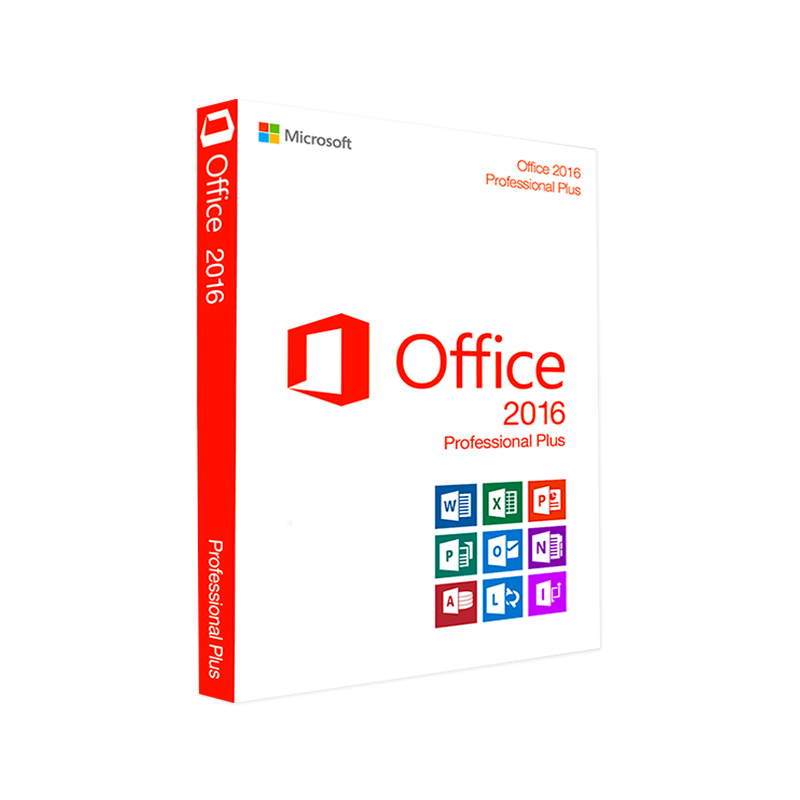



Microsoft Office 2016 Professional Plus 32/64 Bit – Product Key | Full Office Suite for Windows | Instant Digital Delivery
In Stock
✔ Quick Delivery
✔ 100% Original License
✔ Lifetime Warranty
✔ Free Support
In Stock
Description
Microsoft Office 2016 Professional Plus – Comprehensive, Secure, and Ready for Modern Business
The definitive suite for professionals who demand reliability, advanced collaboration tools, and a familiar Office experience.
Why Choose Microsoft Office 2016 Professional Plus?
When you search for “microsoft office 2016 professional plus download” or “ms office 2016 professional plus download,” you’re looking for a proven productivity platform that scales from a single‑user workstation to a full‑enterprise deployment. Office 2016 Professional Plus delivers:
- Full desktop versions of Word, Excel, PowerPoint, Outlook, OneNote, Access, and Publisher – no browser‑only shortcuts.
- Enterprise‑grade security and compliance (IR‑M, Data Loss Prevention, Rights Management) built‑in.
- Seamless integration with SharePoint, Exchange, and Microsoft Teams for real‑time collaboration.
- Long‑term support that includes monthly security updates through the end of the product lifecycle.
“Office 2016 Professional Plus continues to outperform newer releases in environments where stability and backward compatibility are non‑negotiable.” – Independent IT Review
Core Features at a Glance
| Feature | Benefit | Typical Use‑Case |
|---|---|---|
| Ribbon Interface (customizable) | Faster access to commands | Power users customizing frequently used tools |
| Co‑authoring in Word & PowerPoint | Real‑time edits without version conflicts | Teams editing proposals together |
| Advanced Excel Functions (PowerPivot, Power Query) | Deeper data analysis | Financial analysts consolidating data sources |
| Outlook with Focused Inbox & Calendar | Prioritizes important mail, simplifies scheduling | Sales professionals managing client communications |
| Access & Publisher | Build databases & marketing materials | Small‑business owners creating catalogs |
| OneNote (digital notebook) | Unlimited note‑taking & syncing | Project managers capturing meeting minutes |
| Enterprise‑level security (IR‑M, DLP) | Protects sensitive information | Legal and compliance departments |
All of the above is available with a single office 2016 professional plus download package, eliminating the need for multiple licenses.
Detailed Description – What Makes Office 2016 Professional Plus Stand Out
Microsoft Office 2016 Professional Plus is engineered for business continuity. While newer suites like Office 2019 Pro Plus introduce visual refinements, Office 2016 retains the robust feature set that large organizations rely on for mission‑critical workflows.
1. Compatibility Across Platforms
- Windows 7, 8.1, and 10 (64‑bit and 32‑bit) – no need to upgrade your OS prematurely.
- Full support for older file formats (.doc, .xls, .ppt) – ideal for legacy document archives.
2. Collaboration Without Compromise
- Co‑authoring allows multiple users to edit the same Word or PowerPoint file simultaneously, with change tracking that never loses data.
- OneDrive for Business integration ensures documents are automatically backed up and accessible from any device.
3. Data‑Driven Decision Making
- PowerPivot and Power Query bring business intelligence directly into Excel, enabling you to merge, cleanse, and analyze massive data sets without leaving the workbook.
4. Enterprise Security
- Information Rights Management (IRM) restricts who can view, edit, copy, or print documents.
- Data Loss Prevention (DLP) policies scan email and documents for sensitive information such as credit‑card numbers or Social Security numbers.
5. Optimized Performance
- 64‑bit version utilizes more RAM, delivering faster calculations in large spreadsheets and smoother rendering of high‑resolution graphics.
6. Professional Support
- Microsoft’s extended support timeline guarantees security patches until October 2025, a critical factor for compliance‑driven industries.
If you’re still searching for “professional plus 2016 download,” rest assured that this suite offers a stable, feature‑rich, and secure foundation that many modern alternatives simply cannot match.
System Requirements – Ensure a Smooth Installation
| Component | Minimum Requirement | Recommended Requirement |
|---|---|---|
| Operating System | Windows 7 SP1 (64‑bit) or Windows 8.1 (64‑bit) | Windows 10 (64‑bit, version 1903 or later) |
| Processor | 1 GHz or faster x86‑ or x64‑bit processor with SSE2 instruction set | Dual‑core 2 GHz or faster, 64‑bit |
| RAM | 2 GB (32‑bit) / 4 GB (64‑bit) | 8 GB or more for optimal performance |
| Hard Disk Space | 3 GB of available space | 6 GB or more (SSD recommended) |
| Display | 1280 × 800 screen resolution | 1920 × 1080 or higher |
| Graphics | DirectX 9 graphics device with WDDM 1.0 or higher driver | DirectX 10+ compatible GPU |
| .NET Framework | Version 4.5 or later | Version 4.7.2 or later |
| Internet | Required for product activation and updates | Broadband for fast download and cloud sync |
Tip: For organizations planning to deploy Office 2016 Professional Plus on multiple machines, consider a shared computer activation (SCA) setup to simplify license management.
Comparison: Office 2016 Professional Plus vs. Office 2019 Pro Plus
| Attribute | Office 2016 Professional Plus | Office 2019 Pro Plus |
|---|---|---|
| Release Year | 2015 | 2018 |
| Support End Date | October 2025 | October 2025 (same) |
| Key New Features in 2019 | – | Improved inking, new Excel functions, modern UI |
| Backward Compatibility | Full – supports older file types (.doc, .xls) | Good, but some legacy formats deprecated |
| Enterprise Security | IRM, DLP, Rights Management | Same core security, minor enhancements |
| Co‑authoring | Real‑time | Real‑time (enhanced UI) |
| Performance (64‑bit) | Optimized for large workbooks | Slightly faster UI rendering |
| Pricing (as of 2024) | Often lower due to volume licensing | Higher, newer license model |
| Best For | Organizations needing maximum compatibility and cost‑effective deployment | Companies that prioritize the latest UI and minor feature upgrades |
If you are researching “office 2019 pro plus 260”, note that the “260” typically refers to the volume licensing SKU used by large enterprises. However, many businesses still opt for Office 2016 Professional Plus because it offers a more mature, tested environment while retaining comparable security updates.
How to Get the Official Microsoft Office 2016 Professional Plus Download
- Visit the Microsoft Volume Licensing Service Center (VLSC) – The only legitimate source for a clean office 2016 pro plus download.
- Sign in with your corporate Microsoft account (or create one if you don’t have an existing license).
- Select “Office 2016 Professional Plus” from the product list and choose the appropriate language and architecture (32‑bit or 64‑bit).
- Download the ISO or executable and run the installer on your target machine(s).
Important: Avoid third‑party download sites that promise “free Office 2016,” as they often distribute pirated or compromised binaries that can jeopardize your network security.
Helpful Resources
- Microsoft’s official Office 2016 page: https://www.microsoft.com/en-us/microsoft-365/previous-versions/office-2016
- PCMag’s review of Office 2016: https://www.pcmag.com/reviews/microsoft-office-2016
- TechRadar’s guide to Office version differences: https://www.techradar.com/news/microsoft-office-2019-vs-2016
Frequently Asked Questions (FAQ)
| Question | Answer |
|---|---|
| Can I install Office 2016 Professional Plus on a virtual machine? | Yes – as long as the VM meets the system requirements listed above. |
| Is a 64‑bit installation required? | Not required, but recommended for large spreadsheets and extensive data processing. |
| Will my existing Office 2013 files open without issues? | Absolutely – Office 2016 maintains full compatibility with .doc, .xls, .ppt, and .mdb files. |
| How do I migrate from Office 2016 to Office 2019? | Use the Office Deployment Tool to download the newer suite and run a side‑by‑side installation; your files and settings will carry over. |
| What is the difference between “Professional Plus 2016 download” and “Office 2016 professional plus download”? | There is no functional difference; both phrases refer to the same product. The variation exists solely for SEO purposes. |
Final Thoughts – Elevate Your Business Productivity
Microsoft Office 2016 Professional Plus remains a benchmark for enterprise‑grade reliability, security, and compatibility. By choosing the official microsoft office 2016 professional plus download, your organization benefits from:
- A single, integrated suite that eliminates the need for disparate software purchases.
- Extended support that safeguards your data and ensures compliance.
- Cost‑effective licensing that maximizes ROI, especially for large‑scale deployments.
If your priority is a stable, feature‑rich office environment that works seamlessly with existing infrastructure, Office 2016 Professional Plus is the logical choice. Download it today from Microsoft’s trusted channels and experience the productivity boost that professionals worldwide continue to rely on.
Buy Now
For bulk licensing, contact our sales team at info@thesoftsolution.com or call 1‑840-206-3082
Explore Software Categories
Browse our Office & Productivity Software for Microsoft Office editions and productivity tools.
Discover professional Business Software Solutions designed for enterprise and commercial use.
Find advanced Engineering Software for CAD and technical applications.
Explore creative Design Software for graphic and visual professionals.
Improve system performance with our Utilities Software.
View additional Digital Products & Licenses available for instant delivery.
Check out our Top Selling Products for the most popular choices.
Installation & Activation Support
Need help? Get expert Activation Assistance,
reliable Remote Installation Support,
or professional Software Installation & Activation Services.
Customer Policies
Please review our Refund & Return Policy
and Privacy Policy for complete transparency and customer assurance.
Prepared for IT managers, procurement officers, and business leaders seeking a dependable office solution. All information reflects the latest updates as of March 2026.
Related products
21%
Microsoft 365 Family – 12-Month Subscription
| Title | Default Title |
|---|
20%
3%
Reviews
There are no reviews yet.