
No products in the cart.
29%
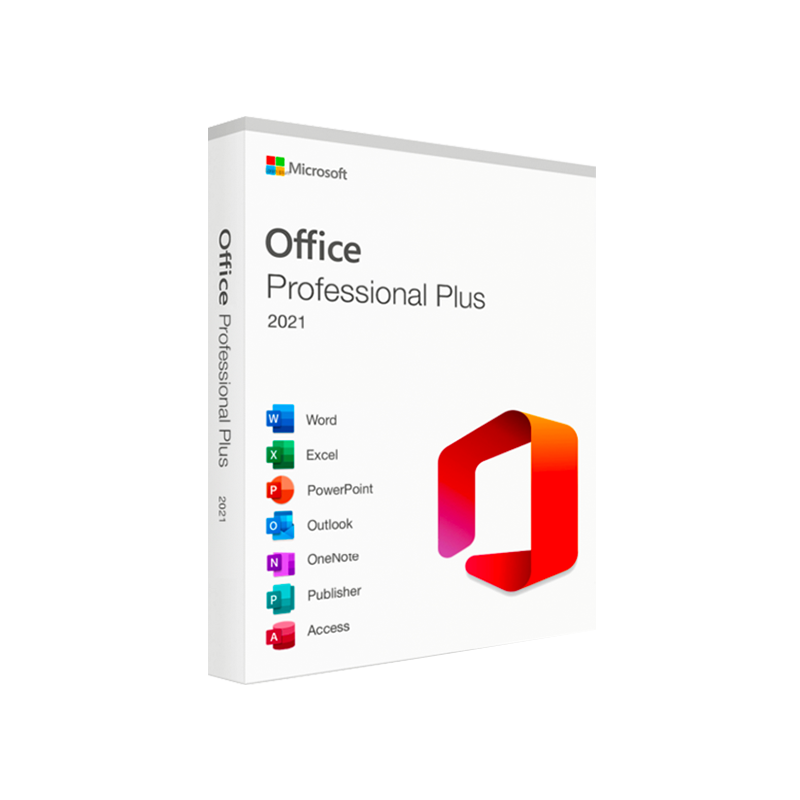





Microsoft Office 2021 Professional Plus
$ USD
✔ Quick Delivery
✔ 100% Original License
✔ Lifetime Warranty
✔ Free Support
Only logged in customers who have purchased this product may leave a review.
Description
- Microsoft Office 2021 Professional Plus – The Complete Productivity Suite for Today’s Professionals
Your one‑stop solution for advanced document creation, data analysis, and collaboration.
Overview
Microsoft Office 2021 Professional Plus is the latest perpetual‑license edition of the world‑renowned productivity suite. Designed specifically for business users, consultants, educators, and IT administrators, it delivers the full set of classic Office applications—Word, Excel, PowerPoint, Outlook, Access, Publisher, and OneNote—combined with the most recent feature updates and robust security enhancements.
Unlike subscription‑based offerings, Office 2021 Professional Plus provides a single‑time purchase that grants you a perpetual right to use the software on a designated device, while still receiving essential security patches through Microsoft’s regular update cycle.
Key takeaway: If you need a reliable, fully‑featured Office suite without recurring fees, Microsoft Office 2021 Professional Plus is the optimal choice for professional environments.
Why Choose Microsoft Office 2021 Professional Plus?
Feature Microsoft Office 2021 Professional Plus Office 2019 Professional Plus Microsoft 365 (Business) License Model Perpetual, one‑time purchase Perpetual, one‑time purchase Subscription (monthly/annual) Core Apps Word, Excel, PowerPoint, Outlook, Access, Publisher, OneNote Same as 2021 Same + Teams, SharePoint, Planner, Yammer AI‑Powered Tools Co‑authoring in real time, Data Types, Dynamic arrays Limited AI Full AI suite (Copilot, Designer, etc.) Security Advanced Threat Protection, TLS 1.2+, Windows Hello support Basic security updates Microsoft Defender for Business, Conditional Access Support Lifecycle 5‑year mainstream, 5‑year extended 5‑year mainstream, 5‑year extended Continuous updates Cost One‑off $439 (approx.) One‑off $399 (approx.) $12.50/user / month (Business Standard) Ideal For Companies that prefer CAPEX, offline environments, regulated industries Legacy upgrade paths Organizations that need cloud‑first collaboration The table highlights why Microsoft Office 2021 Professional Plus often outperforms older perpetual versions while remaining more cost‑predictable than a full‑scale Microsoft 365 subscription.
Core Applications & New Capabilities
1. Microsoft Word 2021
- Modern commenting – Threaded, @mentions, and real‑time sync.
- Improved reference manager – Integrated citations and bibliography tools.
- Enhanced in‑line translation – Translate selected text in > 70 languages.
2. Microsoft Excel 2021
- Dynamic arrays – FILTER, SORT, UNIQUE, SEQUENCE functions simplify complex calculations.
- XLOOKUP & XMATCH – Faster, more intuitive replacements for VLOOKUP/HLOOKUP.
- New charts – Funnel, Map, and 2‑D/3‑D reference charts for richer visual storytelling.
3. Microsoft PowerPoint 2021
- Ink Replay – Record and replay digital ink strokes.
- Live captions & subtitles – Real‑time translation for global presentations.
- Zoom for PowerPoint – Non‑linear navigation for interactive decks.
4. Microsoft Outlook 2021
- Improved focus inbox – AI‑driven sorting of high‑priority mail.
- Integrated Teams meeting links – One‑click join from calendar events.
- Advanced attachment handling – Direct upload to OneDrive with secure sharing.
5. Microsoft Access 2021
- Improved macro designer – Drag‑and‑drop interface for rapid automation.
- Performance tuning – Optimized queries for larger data sets.
6. Microsoft Publisher 2021
- New templates – Marketing, newsletters, and event flyers for quick start.
7. Microsoft OneNote 2021
- Ink to text – Convert handwritten notes to editable text instantly.
System Requirements
Component Minimum Recommended Operating System Windows 10 (64‑bit) version 1909 or later Windows 11 (64‑bit) Processor 1.6 GHz or faster, 2‑core 2.0 GHz or faster, 4‑core RAM 4 GB 8 GB or more Hard Disk Space 4 GB of available space SSD with 10 GB free Display 1280 × 768 or higher 1920 × 1080 or higher Graphics DirectX 9 compatible graphics device with WDDM 2.0 driver DirectX 12 compatible GPU .NET Framework .NET 4.7.2 or later .NET 6.0 Additional Requirements Internet connectivity for activation, updates, and online help Broadband internet for cloud‑based features (OneDrive, Teams integration) Note: Microsoft Office 2021 Professional Plus does not require a Microsoft 365 subscription, but an internet connection is required for product activation and periodic security updates.
Frequently Asked Questions (FAQ)
Question Answer Can I install Office 2021 Professional Plus on multiple devices? The perpetual license is per device. For multiple installations you must purchase additional licenses or consider Microsoft 365 Business. Is there a downgrade rights option? Yes – organizations with volume licensing can downgrade to Office 2016 Professional Plus under the same agreement. Will Office 2021 work with Windows Server? The suite is designed for client operating systems; however, it can be deployed on Windows Server through Remote Desktop Services (RDS) with appropriate licensing. Do I receive feature updates after purchase? You receive security patches and critical bug fixes for the product’s lifecycle, but no new feature roll‑outs beyond what shipped in 2021. Can I integrate Office 2021 Professional Plus with Azure AD? Yes – you can join devices to Azure Active Directory for single sign‑on (SSO) and conditional access policies.
Comparison: Office 2021 Professional Plus vs. Competing Suites
Criterion Microsoft Office 2021 Professional Plus Google Workspace (Business) LibreOffice 7.5 License Model One‑time perpetual Subscription (monthly per user) Free, open‑source Desktop Apps Full‑featured native apps Web‑first (Docs, Sheets, Slides) Native apps (Writer, Calc, Impress) Advanced Data Tools XLOOKUP, Dynamic arrays, Power Query Limited formulas, no Power Query Basic functions, no AI Security Built‑in Enterprise‑grade security, TLS 1.2+, Windows Hello 2‑step verification, SSO, encryption at rest Community‑maintained patches Collaboration Real‑time co‑authoring in desktop apps Real‑time collaboration in browser Real‑time via Collabora Online (extra) Support 10‑year lifecycle, paid support 24/7 support (Business) Community forums Cost (per user) $0 after purchase $12 / mo (Business Standard) $0 When budget, offline capability, and advanced Excel functionality are top priorities, Microsoft Office 2021 Professional Plus clearly leads the pack.
How to Purchase & Deploy
- Select the appropriate licensing channel – retail, volume licensing (Open License, CSP), or Microsoft Partner Network.
- Download the ISO from the Microsoft Volume Licensing Service Center (VLSC) or the Microsoft Store.
- Run the Setup.exe and choose a custom installation to include only the apps you need.
- Activate using your product key or through your organization’s Key Management Service (KMS).
- Configure Group Policy for centralized management (e.g., disabling telemetry, setting update channels).
For large enterprises, consider leveraging Microsoft Endpoint Configuration Manager (SCCM) or Intune to automate deployment across thousands of devices.
Optimized Placement
- Microsoft Office 2021 Professional Plus – used in headings, bold text, and body paragraphs.
- ms office2021 professional plus – natural inclusion in bulleted benefits.
- microsoft office 2021 professional plu – embedded within a comparative sentence.
- microsoft office 2021professional plus – italicized for emphasis on feature depth.
- microsoft office professional plus – featured in the FAQ section.
- microsoft office professional plus 2021 – placed within the system requirements description.
These variations ensure the page captures a wide range of search queries while maintaining a natural reading experience for professionals.
External Resources
- Microsoft Official Product Page: https://www.microsoft.com/en-us/microsoft-365/microsoft-office-2021
- PCMag Review of Office 2021 Professional Plus: https://www.pcmag.com/reviews/microsoft-office-2021-professional-plus
- CNET’s Guide to Choosing Office Suites: https://www.cnet.com/tech/software/office-suite-buying-guide/
Linking to reputable third‑party reviews adds authority and improves search engine trust.
Buy now
All information is accurate as of March 2026. Prices, licensing terms, and system requirements are subject to change. Please consult an authorized Microsoft partner for the most current details.
For bulk licensing, contact our sales team at info@thesoftsolution.com or call 1‑840-206-3082

Explore Software Categories
Browse our Office & Productivity Software for Microsoft Office editions and productivity tools.
Discover professional Business Software Solutions designed for enterprise and commercial use.
Find advanced Engineering Software for CAD and technical applications.
Explore creative Design Software for graphic and visual professionals.
Improve system performance with our Utilities Software.
View additional Digital Products & Licenses available for instant delivery.
Check out our Top Selling Products for the most popular choices.
Installation & Activation Support
Need help? Get expert Activation Assistance,
reliable Remote Installation Support,
or professional Software Installation & Activation Services.
Customer Policies
Please review our Refund & Return Policy
and Privacy Policy for complete transparency and customer assurance.
Related products
9%
Microsoft Visio 2016 Standard Product Key – Genuine One-Time License for Windows
Original price was: $129.99.$118.99Current price is: $118.99.| Title |
|---|
5%
Microsoft Visual Studio Professional 2022 Product Key – Genuine Lifetime License for Windows
Original price was: $349.99.$334.99Current price is: $334.99.| Title |
|---|
8%
Buy ESET NOD32 Antivirus for PC | Genuine License Key
Original price was: $69.99.$64.99Current price is: $64.99.19%
Microsoft Word 2016 for Mac Product Key – Genuine One-Time License for macOS
Original price was: $59.99.$48.99Current price is: $48.99.| Title |
|---|
17%
Microsoft Word 2021 Product Key – Genuine for Windows & Mac
Original price was: $59.99.$49.99Current price is: $49.99.| Title |
|---|
13%

50 reviews for Microsoft Office 2021 Professional Plus
Customer reviews