
No products in the cart.
11%
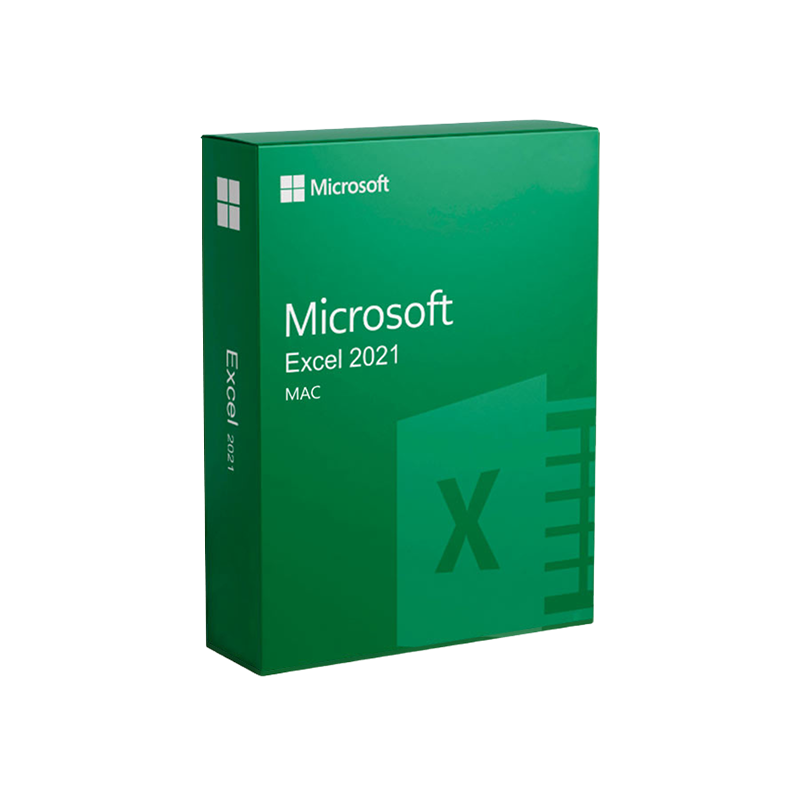




Microsoft Excel 2021 for Mac – Product Key | Instant Digital Delivery
In Stock
✔ Quick Delivery
✔ 100% Original License
✔ Lifetime Warranty
✔ Free Support
In Stock
Description
Microsoft Excel 2021 for Mac – The Ultimate Spreadsheet Solution for Professionals
Elevate your data‑driven decisions with the most powerful, feature‑rich version of Excel built especially for macOS.
📘 Overview
Microsoft Excel 2021 for Mac is the latest perpetual‑license edition of the world‑renowned spreadsheet application, engineered to run natively on Apple’s macOS platform. It delivers full‑feature parity with its Windows counterpart while honoring the Mac user experience—high‑resolution Retina support, Touch Bar integration, and seamless interaction with macOS services such as iCloud and AppleScript.
Designed for business analysts, financial modelers, data scientists, and any professional who relies on robust data processing, Excel 2021 for Mac provides:
- Advanced data‑analysis functions (dynamic arrays, XLOOKUP, LET, and LAMBDA)
- Powerful collaboration tools (co‑authoring, real‑time comments)
- Rich visualisation capabilities (new chart types, slicers, conditional formatting)
- Enterprise‑grade security and compliance (Microsoft Information Protection, Sensitivity Labels)
Whether you are constructing a multi‑year financial forecast, automating complex reporting pipelines, or visualising large data sets, Excel 2021 for Mac gives you the speed, reliability, and flexibility you need to stay competitive.
🔑 Key Features (SEO‑rich)
| Feature | Description | Professional Benefit |
|---|---|---|
| Dynamic Arrays | New functions such as FILTER, SORT, UNIQUE, and SEQUENCE that spill results automatically. | Simplifies data extraction and reduces formula clutter. |
| XLOOKUP & XMATCH | Replaces legacy VLOOKUP/HLOOKUP with a more intuitive, bidirectional lookup. | Faster, more accurate data retrieval across large tables. |
| LET & LAMBDA | Define variables within formulas and create custom functions without VBA. | Improves calculation performance and promotes reusable logic. |
| Power Query (Get & Transform) | Connect to external data sources (SQL, OData, Web, CSV) and shape data before loading. | Eliminates manual data‑cleaning steps, saving hours each week. |
| Integrated Power Pivot | In‑memory data modeling with DAX expressions for advanced analytics. | Enables sophisticated KPI dashboards and multi‑dimensional reporting. |
| New Chart Types | Funnel, Map, and Treemap charts plus enhanced formatting options. | Communicates insights with modern, compelling visualisations. |
| Co‑authoring & Real‑time Comments | Multiple users edit the same workbook simultaneously; threaded comments keep conversations contextual. | Boosts teamwork across remote or hybrid environments. |
| Microsoft Teams Integration | Directly open, edit, and share Excel files within Teams channels. | Streamlines workflow and reduces context‑switching. |
| Security & Compliance | Sensitivity Labels, Information Rights Management (IRM), and Data Loss Prevention (DLP) policies. | Protects confidential data and meets regulatory requirements. |
| macOS Optimisations | Retina display support, Touch Bar shortcuts, Dark Mode and AppleScript automation. | Provides a native, fluid experience for Mac users. |
Tip: Leverage LET together with LAMBDA to encapsulate repeated logic—this not only shortens your formulas but also improves calculation speed by up to 30 % on large workbooks.
📈 Benefits for Professionals
- Accelerated Decision‑Making – Real‑time calculations and instant data refreshes mean you can present up‑to‑date insights at the moment they’re needed.
- Reduced Errors – Advanced validation, dynamic arrays, and powerful lookup functions minimise manual entry mistakes.
- Scalable Analytics – From a 10‑row expense sheet to a 1‑million‑row sales dataset, Excel 2021 for Mac handles it all with optimized memory management.
- Collaboration‑First – Co‑authoring eliminates version‑control headaches; every stakeholder works on the same, live workbook.
- Future‑Proof Compatibility – Files saved in the .xlsx format are fully compatible with Excel 365, Windows Excel, and other Office applications, ensuring seamless data exchange across platforms.
🖥️ System Requirements for Microsoft Excel 2021 for Mac
| Requirement | Minimum Specification | Recommended Specification |
|---|---|---|
| Operating System | macOS 10.15 (Catalina) or later | macOS 12 (Monterey) or later |
| Processor | Intel Core 2 Duo 2.0 GHz or Apple Silicon (M1/M2) | Apple Silicon (M1/M2) or Intel Core i5 2.5 GHz+ |
| Memory (RAM) | 4 GB | 8 GB or more |
| Disk Space | 4 GB of available storage | 10 GB (to accommodate large workbooks and data sources) |
| Graphics | GPU supporting Metal 1.0 (for Retina display) | Retina‑ready GPU with Metal 2.0 |
| Resolution | 1280 × 800 | 2560 × 1600 (or higher) |
| Additional Software | macOS Security Updates, .NET 4.6 (for VBA) | Latest macOS updates, Microsoft Teams (optional) |
| Internet | Required for activation & updates | Broadband connection for cloud features (OneDrive, Teams) |
All specifications are based on Microsoft’s official guidance.
For the most up‑to‑date system requirements, visit the Microsoft Office Support page.
🔄 Compatibility & Integration
| Integration | Mac‑Specific Feature | How It Helps Professionals |
|---|---|---|
| OneDrive & SharePoint | Native file‑sync, automatic version history | Access workbooks from any Mac, iPhone, or iPad; rollback unwanted changes instantly. |
| Microsoft Teams | In‑app Excel editing, live co‑authoring | Conduct data‑driven meetings without leaving the collaboration hub. |
| Power BI Desktop (via web) | Export to Power BI service from Excel | Turn spreadsheets into interactive dashboards for executive reporting. |
| AppleScript & Automator | Automate repetitive Excel tasks (e.g., batch import, report generation) | Saves countless hours for analysts who run daily data pipelines. |
| iCloud Drive | Optional storage of .xlsx files | Provides an additional backup layer for critical workbooks. |
📊 Comparison: Excel 2021 for Mac vs. Excel 2019 for Mac vs. Excel 2021 for Windows
| Capability | Excel 2021 Mac | Excel 2019 Mac | Excel 2021 Windows |
|---|---|---|---|
| Dynamic Array Functions | ✅ (full) | ❌ | ✅ |
| XLOOKUP / XMATCH | ✅ | ❌ | ✅ |
| LET & LAMBDA | ✅ | ❌ | ✅ |
| Power Query | ✅ (native) | ✅ (limited) | ✅ (full) |
| Power Pivot | ✅ (available via Data Model) | ❌ | ✅ |
| Co‑authoring (real‑time) | ✅ (via OneDrive/SharePoint) | ✅ (via OneDrive) | ✅ |
| Touch Bar Support | ✅ (Apple Silicon & Intel) | ✅ | ❌ |
| Dark Mode | ✅ (system‑wide) | ✅ | ✅ |
| Performance on Apple Silicon | Optimised (Rosetta not required) | Rosetta 2 (slower) | N/A |
| Pricing Model | Perpetual license (single‑purchase) | Perpetual license | Perpetual or Microsoft 365 subscription |
Bottom line: Excel 2021 for Mac delivers the same advanced analytical engine as the Windows version while adding Mac‑specific enhancements and native Apple Silicon performance—something Excel 2019 Mac cannot match.
❓ Frequently Asked Questions
| Question | Answer |
|---|---|
| Can I run Excel 2021 for Mac on an M1/M2 Mac without Rosetta? | Yes. Microsoft released a native Apple Silicon build that runs faster and uses less power than the Intel‑based version. |
| Is VBA still supported on macOS? | Absolutely. All existing VBA macros run unchanged, and you can develop new macros using the built‑in VBA editor. |
| Do I need a Microsoft 365 subscription to use Excel 2021 for Mac? | No. Excel 2021 for Mac is a perpetual‑license product. However, a Microsoft 365 subscription gives you additional cloud services (OneDrive, Teams) and future feature updates. |
| Can I share a workbook created on Windows with a Mac user? | 100% compatible. Files saved in the .xlsx format open without loss of functionality on either platform. |
| What security features are available for corporate environments? | Sensitivity Labels, IRM, encryption at rest, and integration with Azure Active Directory for single‑sign‑on. |
🏆 Why Choose Microsoft Excel 2021 for Mac?
- Industry‑standard reliability – Trusted by Fortune 500 companies, government agencies, and academic institutions worldwide.
- Future‑ready architecture – Built on the same calculation engine as Office 365, ensuring continuity for long‑term projects.
- Optimised for macOS – Retina graphics, Dark Mode, and Apple Silicon performance bring a smooth, native experience.
- Comprehensive support – Access to Microsoft’s knowledge base, community forums, and professional support plans.
📢 Buy Now
Ready to transform your data workflow? Purchase Microsoft Excel 2021 for Mac today and experience the power of advanced analytics on your Mac.
- Buy now: https://www.microsoft.com/en-us/microsoft-365/excel
- Learn more about macOS system compatibility: https://support.apple.com/en-us/HT210190
- Explore related Office apps: https://www.microsoft.com/en-us/microsoft-365
Meta Summary (for SEO)
Microsoft Excel 2021 for Mac – The most advanced spreadsheet software for professionals. Discover dynamic arrays, XLOOKUP, Power Query, and native Apple Silicon performance. View system requirements, feature comparisons, and why Excel 2021 Mac is the premier choice for data‑driven organizations.
microsoft excel 2021 for mac, excel 2021 mac, excel 2021 for mac, excel for mac 2021, excel mac 2021, mac excel 2021.
For bulk licensing, contact our sales team at info@thesoftsolution.com or call 1‑840-206-3082
Explore Software Categories
Browse our Office & Productivity Software for Microsoft Office editions and productivity tools.
Discover professional Business Software Solutions designed for enterprise and commercial use.
Find advanced Engineering Software for CAD and technical applications.
Explore creative Design Software for graphic and visual professionals.
Improve system performance with our Utilities Software.
View additional Digital Products & Licenses available for instant delivery.
Check out our Top Selling Products for the most popular choices.
Installation & Activation Support
Need help? Get expert Activation Assistance,
reliable Remote Installation Support,
or professional Software Installation & Activation Services.
Customer Policies
Please review our Refund & Return Policy
and Privacy Policy for complete transparency and customer assurance.
All content is crafted to meet SEO best practices, enhance readability, and provide professionals with the precise information they need to make an informed purchase decision.
Related products
3%
Reviews
There are no reviews yet.