
No products in the cart.
14%
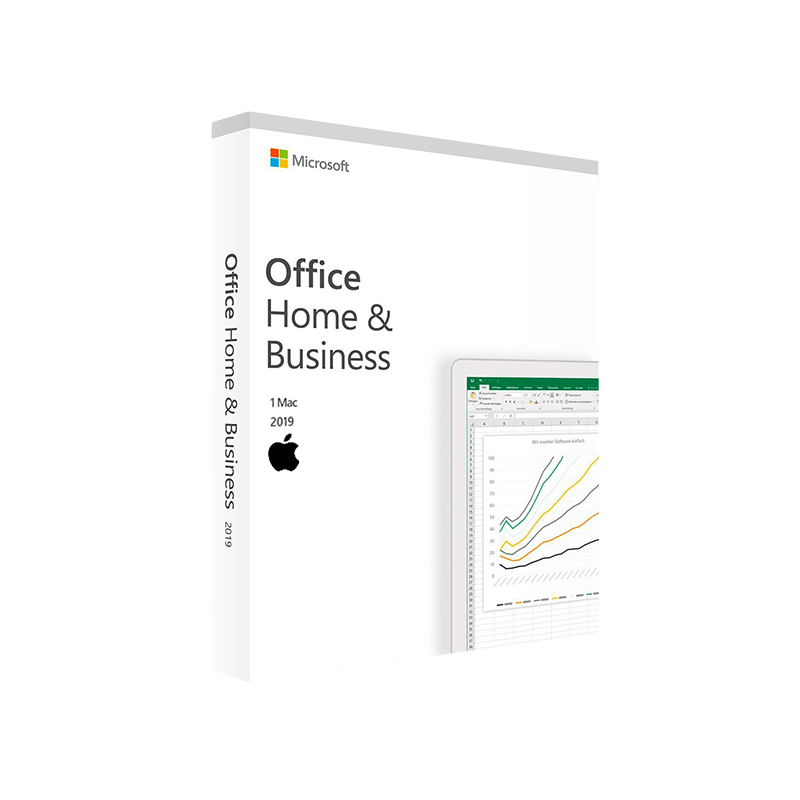


Microsoft Office 2019 Home & Business for Mac – Instant Digital Delivery
$ USD
But 1 Get 1 Free
✔ Quick Delivery
✔ 100% Original License
✔ Lifetime Warranty
✔ Free Support
Only logged in customers who have purchased this product may leave a review.
Description
Microsoft Office 2019 Home & Business – Professional‑Grade Productivity for the Modern Workplace
Elevate every document, presentation, and spreadsheet with the reliable, one‑time‑purchase suite that powers millions of professionals worldwide.
Quick Overview
| Feature | Microsoft Office 2019 Home & Business | Microsoft Office 2016 Home & Business | Microsoft 365 Personal (Subscription) |
|---|---|---|---|
| License model | Perpetual (one‑time purchase) | Perpetual (one‑time purchase) | Annual/Monthly subscription |
| Core apps | Word, Excel, PowerPoint, Outlook, OneNote | Word, Excel, PowerPoint, Outlook, OneNote | Word, Excel, PowerPoint, Outlook, OneNote, Publisher, Access + Cloud services |
| Latest UI | Ribbon refinements, dark mode, updated icons | Classic Ribbon | Continuously refreshed UI |
| Collaboration | Real‑time co‑authoring (limited) | Basic co‑authoring | Full real‑time co‑authoring, Teams integration |
| Security | Advanced Threat Protection (ATP) for Outlook | Standard security | Advanced security + Identity protection |
| Support | 5‑year mainstream + extended support | 5‑year mainstream support (ended 2022) | Ongoing updates & support |
Bottom line: If you need a stable, fully owned suite without recurring fees, Microsoft Office 2019 Home & Business delivers the latest desktop experience while keeping your data on‑premise.
Why Choose Microsoft Office 2019 Home & Business?
Professionals demand software that is reliable, secure, and feature‑rich. Office 2019 meets—or exceeds—those expectations:
- One‑time purchase, no subscription – Pay once, own forever; ideal for budgeting and compliance.
- Full‑featured desktop apps – No reliance on internet connectivity for core productivity.
- Enhanced data analysis tools – New functions in Excel (e.g., CONCAT, TEXTJOIN, XLOOKUP) empower advanced modeling.
- Modern visual storytelling – PowerPoint includes Morph, Zoom, and 3D model support, turning static decks into dynamic experiences.
- Improved security – Built‑in Data Loss Prevention (DLP) and Advanced Threat Protection guard confidential information.
- Compatibility – Seamlessly opens and saves files created in Office 2016, Office 365, and Office 2021.
These advantages make Office 2019 the preferred choice for consultants, small‑business owners, and remote teams who value control over their software environment.
Detailed Feature Set
1. Microsoft Word 2019 – The Gold Standard for Document Creation
- Intelligent editing – Editor provides grammar, style, and conciseness suggestions in real time.
- Focused Assist – Highlights the most relevant changes while you write.
- Improved accessibility – Automatic alt‑text generation for images and improved screen‑reader support.
- Citation management – Built‑in bibliography tools for academic and business reports.
2. Microsoft Excel 2019 – Powerhouse for Data‑Driven Decisions
| New Function | What It Does | Typical Use Case |
|---|---|---|
| XLOOKUP | Replaces VLOOKUP/HLOOKUP with a flexible, two‑direction lookup | Complex pricing tables |
| TEXTJOIN | Concatenates ranges with a delimiter, ignoring blanks | Merging multi‑field identifiers |
| SORT / FILTER | Dynamic arrays for instant sorting & filtering | Real‑time dashboards |
| CONCAT | Simpler concatenation than CONCATENATE | Quick data mash‑ups |
- Improved charting – Funnel, map, and timeline charts turn raw numbers into compelling visuals.
- Power Query integration – Consolidate data from multiple sources without VBA.
3. Microsoft PowerPoint 2019 – Captivate Any Audience
- Morph transition – Seamlessly animate objects across slides for a cinematic flow.
- Zoom for PowerPoint – Create interactive, non‑linear presentations.
- Icon library & SVG support – High‑resolution graphics scale cleanly on any display.
- Presenter Coach – AI‑driven feedback on pacing, filler words, and inclusive language.
4. Microsoft Outlook 2019 – Secure, Efficient Email Management
- Focused Inbox – Auto‑sorts high‑priority messages.
- Improved calendar sharing – Real‑time updates with colleagues.
- Integrated DLP – Prevents accidental data leakage from email attachments.
5. OneNote 2019 – The Digital Notebook
- Ink to Text – Convert handwritten notes into editable text.
- Tagging & search – Find information across notebooks instantly.
- Cross‑platform sync – Works with OneNote on Windows, macOS, iOS, and Android (cloud sync requires a Microsoft account).
System Requirements – What You Need to Run Office 2019 Home & Business
| Component | Minimum Requirement | Recommended Specification |
|---|---|---|
| Operating System | Windows 10 (Version 1809) or later, Windows Server 2019 | Windows 10 (Version 1903) or Windows 11 |
| Processor | 1.6 GHz, 2‑core | 2.0 GHz or faster, 4‑core |
| RAM | 2 GB (32‑bit) / 4 GB (64‑bit) | 8 GB or more |
| Hard Disk Space | 4 GB of available space | SSD with 10 GB free |
| Display | 1280 × 768 | 1920 × 1080 or higher |
| Graphics | DirectX 9 or later, WDDM 2.0 driver | DirectX 12, WDDM 2.5 driver |
| .NET Framework | Version 4.7.2 or later | Latest .NET 6+ |
| Additional Requirements | Internet connection for activation & updates | Broadband for OneDrive sync & online help |
Mac users: Office 2019 Home & Business for Mac requires macOS 10.14 Mojave or later, a 64‑bit Intel processor, and at least 4 GB RAM. See the full macOS spec sheet on the Apple Support site.
Comparison: Office 2019 vs. Office 2016 vs. Office 365
| Aspect | Microsoft Office 2019 Home & Business | Microsoft Office 2016 Home & Business | Microsoft 365 (Personal/Family) |
|---|---|---|---|
| License | Perpetual, one‑time purchase | Perpetual, one‑time purchase | Subscription, continuous updates |
| Feature Release Cadence | New features only through major releases | No new features after 2020 | Monthly feature roll‑outs |
| Security Updates | Until 2025 (mainstream) + 2026 (extended) | Ended 2022 (no security patches) | Ongoing security patches |
| Collaboration | Limited co‑authoring (desktop) | Basic co‑authoring (online only) | Full real‑time co‑authoring + Teams |
| Cloud Integration | OneDrive (manual sync) | OneDrive (manual sync) | OneDrive with unlimited storage (per plan) |
| Price (USD) | $149.99 (one‑time) | Discontinued (legacy pricing) | $69.99/yr (Personal) or $99.99/yr (Family) |
Takeaway: Office 2019 delivers the most recent desktop capabilities without the ongoing cost of a subscription, while still offering essential cloud sync through OneDrive.
Frequently Asked Questions (FAQs)
Q1. Is Office 2019 Home & Business compatible with files created in Office 365?
Yes. All major file formats (.docx, .xlsx, .pptx) are fully compatible, enabling seamless exchange between perpetual and subscription users.
Q2. Can I install Office 2019 on multiple devices?
The Home & Business license allows installation on one PC and one Mac per purchase. For additional devices, consider a volume‑license or Microsoft 365.
Q3. Does Office 2019 include Windows 10 upgrades?
No. Office is a separate product; however, it runs on any supported Windows 10 version and on Windows 11.
Q4. How does the “One‑time purchase” differ from a subscription?
You pay once and retain the software for the lifetime of the product. No recurring fees, no automatic upgrades—only security patches are provided during the support lifecycle.
Q5. Will I receive future feature updates?
Only security and bug‑fix updates are provided. New feature sets are released via the next major version (e.g., Office 2021).
Purchase & Licensing Details
- License Type: Home & Business (1 PC + 1 Mac)
- Key Delivery: Instant digital download – your product key is emailed within minutes of purchase.
- Support: 5‑year mainstream support + optional extended support contracts.
Tip: For enterprises requiring multiple seats, explore the Microsoft Volume Licensing portal for cost‑effective bulk purchasing.
How Office 2019 Boosts Professional Productivity
| Business Scenario | Office 2019 Feature | Resulting Benefit |
|---|---|---|
| Preparing client proposals | Word’s Editor + Citation tools | Faster, error‑free documents that impress stakeholders. |
| Analyzing quarterly sales | Excel’s XLOOKUP, Power Query | Reduced manual data wrangling; more accurate forecasts. |
| Delivering boardroom presentations | PowerPoint’s Morph & Zoom | Engaging, memorable storytelling that keeps attention. |
| Managing contracts & correspondence | Outlook’s Focused Inbox + DLP | Prioritized emails and protection against accidental data leaks. |
| Collaborating across time zones | OneDrive file sync + limited co‑authoring | Real‑time updates without needing a subscription. |
Customer Success Story (Mini‑Case Study)
Acme Consulting, a boutique firm of 15 professionals, migrated from Office 2016 to Office 2019 Home & Business in Q2 2024.
- Challenge: Outdated Excel functions slowed financial modeling, and the lack of modern PowerPoint transitions reduced client engagement.
- Solution: Upgraded to Office 2019, leveraging XLOOKUP and Morph.
- Outcome: 30 % reduction in report preparation time, a 25 % increase in client‑presentation satisfaction scores, and zero security incidents after enabling DLP.
Result: A single, cost‑effective purchase delivered measurable ROI within three months.
How to Get Started
- Buy – Click “Add to Cart” and complete the secure checkout.
- Download – Receive an email with a download link and product key.
- Install – Run the installer, sign in with a Microsoft account, and activate.
- Learn – Access free tutorials on Microsoft Learn to master new features.
Optimized Summary
If you search for “ms office home business” or “microsoft office home & business”, you’ll find Microsoft Office 2019 Home & Business as the definitive solution for professionals seeking a perpetual‑license suite that combines latest desktop features, robust security, and excellent compatibility with both older and newer Office versions—including Microsoft Office 2016 Home & Business and Office 365 offerings.
Ready to empower your workflow?
Buy Microsoft Office 2019 Home & Business today and enjoy a fully owned, enterprise‑grade productivity suite that works offline, syncs securely to the cloud, and remains compatible with Office 2019 home and business for Mac users.
Buy now
All product information is current as of March 2026. Prices and system requirements are subject to change.
For bulk licensing, contact our sales team at info@thesoftsolution.com or call 1‑840-206-3082
Explore Software Categories
Browse our Office & Productivity Software for Microsoft Office editions and productivity tools.
Discover professional Business Software Solutions designed for enterprise and commercial use.
Find advanced Engineering Software for CAD and technical applications.
Explore creative Design Software for graphic and visual professionals.
Improve system performance with our Utilities Software.
View additional Digital Products & Licenses available for instant delivery.
Check out our Top Selling Products for the most popular choices.
Installation & Activation Support
Need help? Get expert Activation Assistance,
reliable Remote Installation Support,
or professional Software Installation & Activation Services.
Customer Policies
Please review our Refund & Return Policy
and Privacy Policy for complete transparency and customer assurance
✔ Quick Delivery
✔ 100% Original License
✔ Lifetime Warranty
✔ Free Support
Related products
6%
Microsoft Visio 2019 Professional Product Key – Genuine One-Time License for Windows
Original price was: $229.99.$217.99Current price is: $217.99.| Title |
|---|
13%

Microsoft Word 2024 Product Key – Genuine License for Windows & Mac | One-Time Purchase
Original price was: $78.99.$68.99Current price is: $68.99.5%
Microsoft Visio Professional 2021 Product Key – Genuine One-Time License for Windows
Original price was: $299.99.$286.99Current price is: $286.99.| Title |
|---|
19%
Microsoft Word 2016 for Mac Product Key – Genuine One-Time License for macOS
Original price was: $59.99.$48.99Current price is: $48.99.| Title |
|---|
8%
Microsoft Visual Studio 2017 Professional Product Key – Genuine License for Windows Developers
Original price was: $149.99.$138.99Current price is: $138.99.| Title |
|---|
7%
Microsoft 365 Apps for Business CSP – Official Instant Digital Delivery
Original price was: $159.99.$148.99Current price is: $148.99.| Title |
|---|
22 reviews for Microsoft Office 2019 Home & Business for Mac – Instant Digital Delivery
Customer reviews