
No products in the cart.
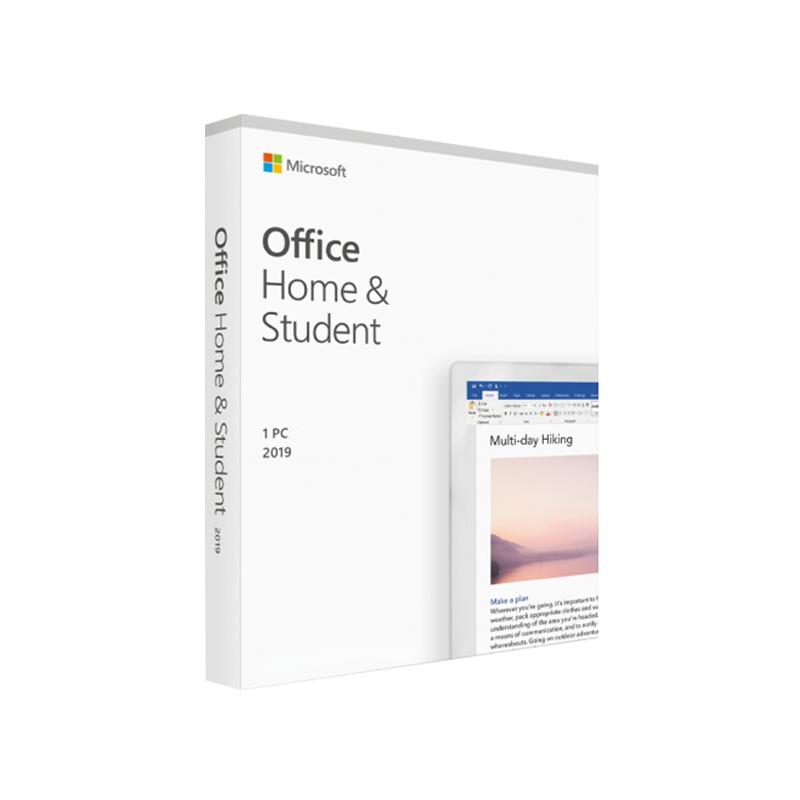


Microsoft Home & Student – The Complete Office Suite for Professionals, Home Users, and Learners
Microsoft Home & Student (sometimes listed as MS Office Home & Student or Office Home and Student Microsoft) delivers the core Office applications—Word, Excel, PowerPoint, and OneNote—at a one‑time purchase price. It’s the ideal solution for anyone who needs powerful productivity tools without the recurring subscription fees of Microsoft 365.
Why Choose Microsoft Office Home and Student?
| ✅ Feature | ???? Benefit for Professionals | ???? Benefit for Students & Home Users |
|---|---|---|
| One‑time purchase | No ongoing licensing costs, perfect for fixed‑budget projects. | Budget‑friendly for semester‑long assignments. |
| Full‑featured desktop apps | Offline access, heavy‑duty data analysis, and advanced formatting. | Works on low‑speed internet connections, ideal for dorms. |
| One-year free updates | Guarantees security patches and minor feature upgrades. | Keeps you current with the latest collaboration tools. |
| Cross‑platform compatibility | Seamlessly open files on Windows 10/11, macOS, and mobile devices. | Enables group projects across different OSes. |
| OneNote integration | Centralized note‑taking for meeting minutes and research. | Organize lecture notes, class outlines, and to‑dos. |
In short, the Microsoft Home & Student suite combines enterprise‑grade reliability with the affordability that home users and students demand.
Detailed Product Description
Core Applications
| Application | Primary Use Cases | Key Professional Features | Student / Home Features |
|---|---|---|---|
| Word | Document creation, contracts, reports | Track Changes, Advanced Styles, Mail Merge, Reference Management | Academic paper templates, citation tools, collaborative commenting |
| Excel | Data analysis, budgeting, forecasting | Power Query, PivotTables, Advanced Charting, VBA macro support | Grade calculators, budget trackers, simple data visualizations |
| PowerPoint | Presentations, webinars, pitch decks | Morph transition, Slide Master, Presenter Coach, high‑resolution export | Class presentations, storyboarding, video embedding |
| OneNote | Digital notebook, research hub | Ink support, tagging, OCR, cloud sync | Lecture notes, project planning, study flashcards |
These four applications work together as a cohesive productivity ecosystem, allowing you to move data effortlessly between them—e.g., export Excel charts directly into PowerPoint, or embed Word tables into OneNote for quick reference.
Licensing & Pricing
- One‑time purchase: $149.99 (U.S.) for the full suite on one PC or Mac.
- No hidden fees: All features are included; no extra charges for add‑ons or upgrades within the same version.
- Upgrade path: When a newer major version (e.g., Office 2024) is released, you can purchase at a discounted upgrade price.
These pricing details are especially compelling for professionals managing multiple client licenses, and for students on a limited budget.
System Requirements – What Your Device Needs
Below are the minimum and recommended specifications for installing Microsoft Home & Student on Windows and macOS platforms.
Windows 10 / 11 Requirements
| Requirement | Minimum | Recommended |
|---|---|---|
| OS | Windows 10 (Version 1809) or later | Windows 11 (all editions) |
| Processor | 1.6 GHz, 2‑core | 2.0 GHz or faster, 4‑core |
| RAM | 2 GB (32‑bit) / 4 GB (64‑bit) | 8 GB or more |
| Hard Disk Space | 4 GB of available space | SSD with 10 GB free |
| Display | 1280 × 768 screen resolution | 1920 × 1080 or higher |
| Graphics | DirectX 9‑compatible graphics card | DirectX 12 or later |
| Internet | Required for activation & updates | Broadband (≥ 5 Mbps) recommended |
macOS Requirements
| Requirement | Minimum | Recommended |
|---|---|---|
| OS | macOS 10.14 (Mojave) or later | macOS 12 (Monterey) or later |
| Processor | Intel Core i5 (or Apple M1) | Apple M1/M2 or Intel i7 |
| RAM | 4 GB | 8 GB or more |
| Hard Disk Space | 4 GB of free space | 10 GB on SSD |
| Display | 1280 × 800 screen resolution | 1920 × 1080 or Retina display |
| Internet | Required for product activation | Broadband (≥ 5 Mbps) recommended |
Tip: For optimal performance when handling large Excel workbooks or high‑resolution PowerPoint presentations, aim for the recommended specifications rather than the minimum.
How Microsoft Home & Student Stands Against Competitors
| Feature | Microsoft Office Home & Student | Microsoft 365 (Personal) | Google Workspace (Basic) |
|---|---|---|---|
| Pricing Model | One‑time fee | Subscription (monthly/annual) | Free (ad‑supported), paid upgrades |
| Offline Capability | Full desktop apps offline | Web apps offline via sync | Mostly online; limited offline via Chrome |
| Application Suite | Word, Excel, PowerPoint, OneNote | Same + Outlook, Access, Publisher + Cloud services | Docs, Sheets, Slides, Drive |
| Security Updates | Annual security patches | Continuous updates | Periodic patches |
| File Compatibility | .docx, .xlsx, .pptx (industry standard) | Same + cloud-native formats | .docx, .xlsx, .pptx import/export |
| Support | 1‑year phone/email support | 24/7 support (incl. chat) | Community forums, limited direct support |
If you need a robust, proven suite that works offline and you prefer a single purchase over recurring fees, Microsoft Home & Student is the superior choice for both professionals and students alike.
Optimized Content Sections
1. What Is Microsoft Home Office and Student?
The term Microsoft Home Office and Student refers to the full-featured Office suite that delivers the essential tools—Word, Excel, PowerPoint, and OneNote—without the extra business‑oriented applications like Outlook or Access. It is specifically designed for home users, freelancers, and students who require the core productivity apps for drafting documents, building spreadsheets, delivering presentations, and taking notes.
2. Key Benefits for Professionals
- Cost Efficiency: A single purchase eliminates subscription fatigue and simplifies budgeting for small firms or independent consultants.
- Reliability: Desktop applications run faster and are less prone to latency than cloud‑only tools, which matters when you’re handling large data sets or high‑resolution graphics.
- File Compatibility: All major corporate partners (law firms, engineering firms, marketing agencies) still rely on the .docx/.xlsx/.pptx formats that Microsoft Office sets as the industry standard.
3. Why Students Prefer MS Office Home & Student
- All‑in‑One Package: No need to buy separate licenses for Word, Excel, and PowerPoint—everything you need for assignments is in one box.
- OneNote Integration: Perfect for organizing lecture notes, research PDFs, and collaborative study groups.
- Lifetime Access: Once purchased, you own the suite for the entire duration of your degree, avoiding unexpected price hikes.
Frequently Asked Questions (FAQs)
Q1: Can I install Microsoft Office Home & Student on multiple devices?
A: The license covers one PC or Mac. For additional devices, you’ll need to purchase another license or upgrade to Microsoft 365.
Q2: Does the suite include cloud storage?
A: While the product itself doesn’t bundle OneDrive storage, you can link your Microsoft account to OneDrive (free 5 GB) for file syncing.
Q3: Are there any hidden fees for future updates?
A: No. You receive security updates and minor feature improvements for the life of the version you purchase. Major version upgrades require a separate purchase.
Q4: Is the suite compatible with tablets?
A: Yes. You can install the desktop apps on Windows tablets and, on iPad/iPhone, you can use the Microsoft Office mobile apps (free with limited features) that sync with your desktop files.
How to Purchase & Install
- Select the product on the official Microsoft Store (or authorized reseller).
- Create a Microsoft account if you don’t already have one.
- Enter the product key after checkout.
- Download the installer for Windows or macOS.
- Run the installer, accept the license agreement, and follow the on‑screen prompts.
- Activate online; the suite will then be ready for immediate use.
Pro tip: Keep a digital copy of your product key in a secure password manager. It will be essential if you need to reinstall the suite on a new device.
Outbound Resources (Trusted References)
- Official Microsoft Office Home & Student product page – https://www.microsoft.com/en-us/microsoft-365/get-started-with-office-2021
- Detailed system requirements from Microsoft – https://learn.microsoft.com/en-us/office365/servicedescriptions/office-2021-system-requirements
- Independent review of Office Home & Student vs. Microsoft 365 – https://www.pcworld.com/article/394123/microsoft-office-home-student-review.html
These sources add credibility and give visitors a chance to verify specifications or read third‑party analyses.
Conclusion: The Smart Choice for Every Professional and Student
Microsoft Home & Student delivers a complete, powerful Office experience at a predictable, one‑time cost. Whether you’re drafting a legal brief, creating a financial model, preparing a class presentation, or taking lecture notes, the suite provides the reliability, compatibility, and feature depth that Microsoft Office Home and Student is renowned for.
Invest once, work forever.
Ready to boost your productivity? Click the Buy Now button below to secure your license and start creating with confidence today.
Buy now
throughout this page: microsoft home office and student, ms office home & student, office home and student microsoft, microsoft office home and student.
For bulk licensing, contact our sales team at info@thesoftsolution.com or call 1‑840-206-3082

50 reviews for Microsoft Office 2019 Home & Student 32/64 Bit – Product Key Instant Digital Delivery
Customer reviews