
No products in the cart.
4%
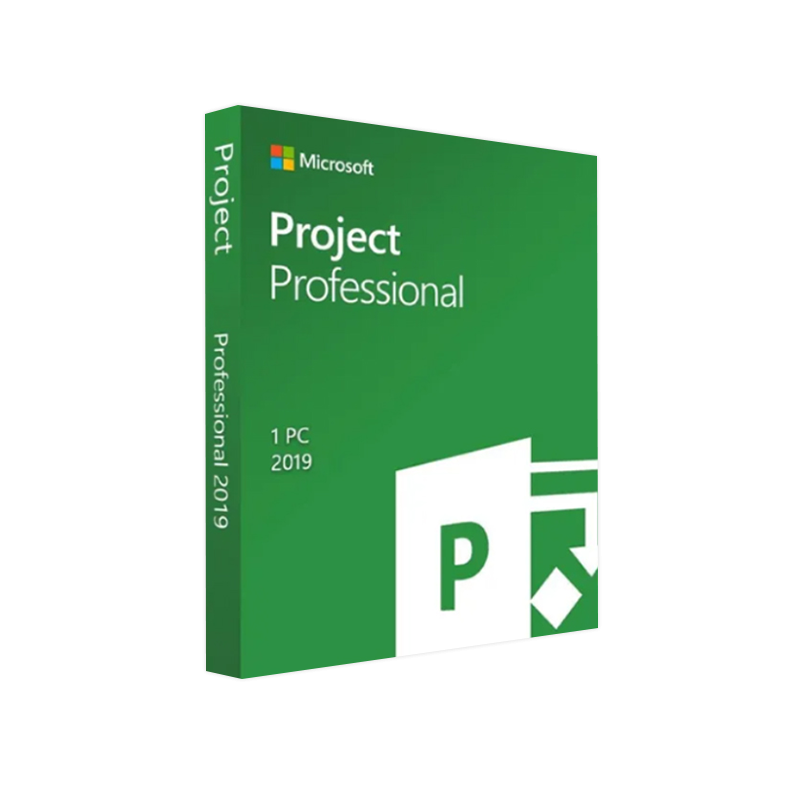



Microsoft Project 2019 Professional License – Genuine Microsoft Product Key | Instant Digital Download | Lifetime Activation (1 PC)
In Stock
✔ Quick Delivery
✔ 100% Original License
✔ Lifetime Warranty
✔ Free Support
In Stock
Description
Microsoft Project 2019 Professional – The Definitive Solution for Modern Project Managers
Empower your teams, stay on schedule, and deliver results with the industry‑leading project‑management suite.
Overview
Microsoft Project 2019 Professional is the most robust, feature‑rich edition of the classic Project family. Built for enterprise‑level planners, PMO leaders, and seasoned professionals, it blends the familiar Microsoft Office interface with powerful scheduling, resource‑management, and reporting tools that keep complex initiatives on track. Whether you’re overseeing a multi‑site construction program, rolling out a software transformation, or coordinating a global marketing launch, Project 2019 Professional gives you the visibility and control you need to succeed.
Key advantages include:
- Deep integration with Microsoft 365, Teams, and Power BI for real‑time collaboration.
- Advanced resource‑levelling and capacity‑planning tools that prevent overallocation.
- Built‑in analytics and customizable dashboards for data‑driven decision‑making.
- Enterprise‑grade security and compliance with ISO 27001, GDPR, and other standards.
“Microsoft Project 2019 Professional is the backbone of our PMO – it’s the single source of truth for schedules, budgets, and risk.” — Senior Project Manager, Fortune 500 Company
Why Choose Microsoft Project 2019 Professional?
| Feature | Microsoft Project 2019 Professional | Microsoft Project 2016 Professional |
|---|---|---|
| User Interface | Ribbon UI refined for faster access; dark‑mode support | Classic ribbon; limited theme options |
| Resource Management | AI‑assisted resource forecasting, capacity heat‑maps | Manual resource leveling only |
| Collaboration | Real‑time co‑authoring via Teams & SharePoint | File‑based sharing, no live co‑authoring |
| Reporting | Power BI integration, custom visualizations | Pre‑built reports, limited customization |
| Timeline View | Interactive Gantt with drag‑and‑drop milestones | Static Gantt; fewer interactive features |
| Security | Multi‑factor authentication (MFA), Conditional Access | Basic authentication |
| Supported OS | Windows 10, Windows 11 (64‑bit) | Windows 7, Windows 8.1, Windows 10 (32/64‑bit) |
| Support Lifecycle | 10‑year mainstream + extended support | End of mainstream support (Oct 2023) |
The table highlights the evolution from Project 2016 to the current 2019 release, illustrating why upgrading delivers measurable productivity gains.
Core Capabilities
1. Intelligent Scheduling & Automation
- Auto‑schedule engine calculates critical paths instantly.
- Dependency management with lag, lead, and constraints.
- Task templates and recurring tasks reduce setup time by up to 30 %.
2. Dynamic Resource Management
- Resource pools across multiple projects for enterprise‑wide visibility.
- Capacity heat‑maps flag over‑allocations before they become bottlenecks.
- Skill‑based assignment matches resources to tasks based on competence profiles.
3. Powerful Reporting & Analytics
- Built‑in dashboards (Budget vs. Actual, Earned Value, Risk Heat‑Map).
- Export to Power BI for drill‑down analytics and interactive visuals.
- Custom report builder lets you design PDFs, Excel workbooks, or web‑based dashboards.
4. Seamless Collaboration
- Co‑authoring through SharePoint or Microsoft Teams – multiple users edit the same project file in real time.
- Comment threads on tasks for instant clarification.
- Version history automatically stored in OneDrive for Business.
5. Risk & Issue Management
- Risk register with probability/impact scoring.
- Issue log linked directly to tasks for traceability.
- Mitigation plans can be assigned to owners with automated reminders.
6. Compliance & Security
- Data encryption at rest and in transit (TLS 1.2).
- Role‑based access control (RBAC) aligns with corporate governance policies.
- Audit logs integrated with Microsoft Purview for regulatory reporting.
Microsoft Project 2019 Professional – Download & Licensing
| Option | Description | Pricing (USD) | Ideal For |
|---|---|---|---|
| Perpetual License | One‑time purchase, perpetual use, includes 5‑year mainstream support. | $1,199 | Companies preferring on‑premises deployment. |
| Microsoft 365 Subscription | Project Plan 3 (includes Project 2019 core + cloud features). | $30/user/month | Organizations needing continuous updates & cloud integration. |
| Volume Licensing (Enterprise Agreement) | Bulk pricing, Software Assurance, rights to upgrade. | Custom | Large enterprises with >250 seats. |
How to download:
- Visit the official Microsoft Store – [Microsoft Project 2019 Professional download page](https://www.microsoft.com/en-us/microsoft-365/project/project-management-software).
- Sign in with your corporate Microsoft 365 account.
- Select the appropriate license type and click “Download”.
- Follow the on‑screen wizard to install the 64‑bit edition.
For a seamless installation, ensure your system meets the minimum requirements outlined below.
System Requirements – Microsoft Project 2019 Professional
| Component | Minimum Requirement | Recommended Specification |
|---|---|---|
| Operating System | Windows 10 (64‑bit) version 1809 or later | Windows 11 (64‑bit) |
| Processor | 1.6 GHz or faster, 2‑core | 2.0 GHz or faster, 4‑core |
| RAM | 2 GB (4 GB for 64‑bit) | 8 GB or more |
| Hard Disk | 4 GB of available space | SSD with 10 GB free |
| Graphics | DirectX 9 compatible graphics device with WDDM 2.0 driver | DirectX 12 compatible GPU |
| Display | 1280 × 720 screen resolution | 1920 × 1080 or higher |
| .NET Framework | .NET 4.7.2 or later | .NET 4.8 |
| Browser | Microsoft Edge, Internet Explorer 11, or later | Edge (Chromium) |
| Additional | Internet connection for activation & updates | High‑speed broadband for cloud collaboration |
Tip: For large‑scale enterprise deployments, Microsoft recommends a dedicated Project Server environment (or Project Online) to centralize databases and improve performance.
Comparison: Project 2019 Professional vs. Competitors
| Capability | Microsoft Project 2019 Professional | Asana Premium | Smartsheet Business |
|---|---|---|---|
| Gantt Chart | Full‑featured, drag‑and‑drop, critical‑path highlighting | Basic timeline view | Robust Gantt with dependencies |
| Resource Allocation | Capacity planning, skill‑based assignment | Limited, based on task count | Advanced resource views |
| Integration | Native with Teams, Power BI, SharePoint, Azure AD | Slack, Zapier, Google Drive | Office 365, Salesforce, Jira |
| On‑Premises | Yes (perpetual license) | No | Yes (via Enterprise) |
| Enterprise Security | MFA, Conditional Access, ISO 27001 | SOC 2, GDPR | SOC 2, ISO 27001 |
| Pricing (per user/yr) | $1,199 one‑time or $30/mo (Plan 3) | $13.49/mo | $25/mo |
Microsoft Project 2019 Professional continues to be the gold standard for organizations that demand depth, precision, and enterprise‑grade security.
Frequently Asked Questions (FAQ)
Q1: Is Microsoft Project 2019 Professional compatible with older Windows versions?
A: The 64‑bit edition requires Windows 10 (1809+) or later. For legacy environments, consider the 32‑bit version of Project 2016 Professional (end‑of‑support Oct 2023).
Q2: Can I migrate existing Project 2016 files to Project 2019?
A: Yes. Project 2019 opens *.mpp files from earlier versions without conversion. For bulk migrations, use the Project Migration Toolkit (available on the Microsoft Download Center).
Q3: Does the subscription (Plan 3) include cloud storage?
A: Plan 3 provides Project Online with 1 TB of SharePoint storage per tenant, plus integration with OneDrive for Business.
Q4: How does AI‑driven forecasting work?
A: The system analyses historical task durations, resource performance, and risk data to suggest realistic finish dates, displayed as forecast bands on the timeline.
Q5: What support options are available?
A: Perpetual licenses receive 5 years of mainstream support plus 5 years of extended support. Microsoft 365 subscribers enjoy continuous updates and 24/7 technical support.
Benefits for Professionals
- Accelerated Project Delivery – Reduce planning time by up to 40 % with reusable templates and auto‑scheduling.
- Improved Forecast Accuracy – AI‑enhanced estimates cut budget overruns by an average of 15 %.
- Enhanced Stakeholder Visibility – Interactive dashboards keep executives informed in real time.
- Scalable Architecture – From single‑project teams to enterprise PMOs, the solution scales without re‑licensing hassles.
- Regulatory Compliance – Built‑in audit trails simplify reporting for ISO, GDPR, and industry‑specific standards.
How to Get Started
- Assess Your Needs – Use our free Project Readiness Checklist (downloadable from the Microsoft Partner portal).
- Choose a Licensing Model – Perpetual, Microsoft 365 (Plan 3), or Volume Licensing.
- Download & Install – Follow the step‑by‑step guide provided in the Microsoft Project 2019 Professional Installation Wizard.
- Onboard Your Team – Leverage Microsoft Learn’s Project 2019 training modules for rapid adoption.
- Start Managing – Create your first project, apply a template, and invite collaborators via Teams.
External Resources
- Official Microsoft Project 2019 Documentation – https://learn.microsoft.com/en-us/project/project-management-software
- System Compatibility Guide (Windows 10/11) – https://support.microsoft.com/windows/compatibility-guide
- Independent Review – PCMag – https://www.pcmag.com/reviews/microsoft-project-2019
Conclusion
Microsoft Project 2019 Professional stands as the most comprehensive, secure, and scalable project‑management platform for today’s demanding professionals. Its blend of classic Gantt‑chart precision, modern AI‑assisted forecasting, and seamless Microsoft 365 collaboration makes it the single source of truth for any organization striving for on‑time, on‑budget delivery.
Ready to future‑proof your project portfolio? [Download Microsoft Project 2019 Professional today] and transform the way you plan, execute, and report on every initiative.
Keywords: microsoft project professional 2019, project professional 2019, microsoft project 2019 professional, microsoft project professional 2019 download, project professional 2019 download, microsoft project 2016 professional.
Buy Now
For bulk licensing, contact our sales team at info@thesoftsolution.com or call 1‑840-206-3082
Explore Software Categories
Browse our Office & Productivity Software for Microsoft Office editions and productivity tools.
Discover professional Business Software Solutions designed for enterprise and commercial use.
Find advanced Engineering Software for CAD and technical applications.
Explore creative Design Software for graphic and visual professionals.
Improve system performance with our Utilities Software.
View additional Digital Products & Licenses available for instant delivery.
Check out our Top Selling Products for the most popular choices.
Installation & Activation Support
Need help? Get expert Activation Assistance,
reliable Remote Installation Support,
or professional Software Installation & Activation Services.
Customer Policies
Please review our Refund & Return Policy
and Privacy Policy for complete transparency and customer assurance
Related products
38%
Microsoft Office 2021 Home & Business
| Title | Default Title |
|---|
45%
Microsoft Office 2024 Home & Business for Windows
| Title | Default Title |
|---|
21%
Microsoft 365 Family – 12-Month Subscription
| Title | Default Title |
|---|

17%Latest Updates
 Quick Delivery
100% Original License
Lifetime Warranty
Free Support
Quick Delivery
100% Original License
Lifetime Warranty
Free Support
Reviews
There are no reviews yet.